Best Zillow Investment Analyzers in 2026: Top 5 Chrome Extensions Compared
Compare Realy, BetterDeal AI, CashOn, REIPrime, and Ostrich, the best Zillow analyzers and rental property calculators for cash flow, cap rate, and bulk deal screening.
If you browse Zillow for rental properties, you already know the platform was built for home buyers, not investors. List price and photos are easy to find. Cash flow, cap rate, cash-on-cash return, and NOI are not.
That gap is why Zillow investment analyzers and Chrome extensions for Zillow have exploded. Instead of copying every listing into a spreadsheet, investors want a rental property analysis tool that runs numbers where they already search.
This guide compares the five tools investors ask about most in 2026: Realy, BetterDeal AI, CashOn, REIPrime, and Ostrich. Every feature claim below comes from documented product capabilities supplied for this review, not invented marketing copy. Where something is not listed, we say so.
What you'll learn:
- Which tool fits beginners vs. bulk screeners vs. single-listing analysis
- How each product handles calculation assumptions and bulk analysis
- Trade-offs on speed, export, customization, and free tiers
- How to choose the best rental property calculator for your workflow
Table of Contents
- Why investors use Zillow analyzers
- Quick comparison table
- Realy review
- BetterDeal AI review
- CashOn review
- REIPrime review
- Ostrich review
- Buyer's guide: how to choose
- Which analyzer should you choose?
- FAQ
- Conclusion
Why Investors Use Zillow Analyzers
Zillow dominates residential discovery. Most buy & hold, BRRRR, and wholesale investors start there. The problem is underwriting friction:
| Pain point | Spreadsheet workflow | Chrome extension workflow |
|---|---|---|
| Screen 50 listings | Hours of copy-paste | Minutes on search results |
| Update interest rate | Rebuild every row | Change once, recalc all |
| Compare cash-on-cash | Manual sorting | Sort table by CoC |
| Share with partner | Email messy sheets | Export or share report |
A good investment property analysis software layer adds rental property cash flow, cap rate, and cash-on-cash return directly on Zillow, so you spend time on diligence, not data entry.
Does Zillow calculate ROI? No. Zillow does not show cap rate, NOI, DSCR, or cash-on-cash on listings. You need a Zillow investment calculator or extension. See our dedicated guide: Does Zillow show cap rate?.
Why spreadsheets break down on Zillow
The classic workflow looks like this: export or copy listing address, price, beds, sqft, tax, and rent guess into Excel. Build formulas for NOI, cap rate, and cash-on-cash. Sort. Repeat for the next property. Change your interest rate assumption? Update the whole sheet.
That workflow has three failure modes:
- Stale data: Zillow list prices and reductions change daily; spreadsheets lag.
- Inconsistent assumptions: Row 12 uses 6.5% interest; row 40 still has 7% from last week.
- Selection bias: You only paste listings that look good in photos, not the full search universe.
A chrome extension for Zillow that calculates on the live page solves consistency and speed. The best tools also let you analyze Zillow properties in bulk so ranking is statistical, not emotional.
What "best" means in 2026
We evaluated these tools on criteria real investors use daily:
- Can I run rental property analysis on a full search page?
- Can I customize financing and operating expenses?
- Can I export results with my assumptions attached?
- Is it fast enough for weekly market sweeps?
- Does the free tier let me learn before I pay?
No tool wins every column. This article tells you who wins your column.
Quick Comparison Table
Legend: Yes = clearly supported per documented features · Limited = partial or restricted · No = not documented · — = not confirmed in supplied comparison data
| Feature | Realy | BetterDeal AI | CashOn | REIPrime | Ostrich |
|---|---|---|---|---|---|
| Chrome extension | Yes | Yes | Yes | Yes | Yes |
| Zillow overlay on listings | Yes | Yes | Yes | Yes | Yes |
| Full search results / bulk analysis | Yes | Limited | Yes (hundreds) | No | No |
| Single listing analysis | Yes | Yes | No | Yes | Yes |
| Bulk includes calculated fields | Yes | No | Limited for new users | — | No |
| Bulk export with assumptions | Yes | No | Limited for new users | — | No |
| Full calculation assumption control | Yes | Limited | Yes | Yes (inputs not editable on dashboard) | Limited |
| Dedicated per-property analysis page | Yes (fully customizable) | Yes (no calc customization) | No | Yes (dashboard) | — |
| Map view in bulk analysis | Yes (custom clickpoints) | — | — | — | — |
| Customizable table columns / theme | Yes | — | Low column management | — | — |
| Smart filters in bulk view | Yes | — | — | — | — |
| ARV & comparables | — | Yes | — | — | — |
| Analysis speed (bulk) | Fast (documented) | Slow | Slower bulk compute | Instant (single) | — |
| Generous free tier | Yes | Limited for new users | Limited for new users | Free | Free |
| Best for (summary) | Bulk screening + deep underwriting | ARV / comps focus | High-volume basic screen | Free instant single analysis | Simple free single listing |
Investment metrics note: Realy calculates NOI, cap rate, loaded cap rate, cash-on-cash, DSCR, cash flow, rent/sqft, and related fields via its calculation engine (see NOI guide). Other tools perform "investment analysis" or "cashflow analysis" per their positioning; specific metric coverage beyond what is listed in our comparison data is not documented here and may vary.
| Metric / capability | Realy | BetterDeal AI | CashOn | REIPrime | Ostrich |
|---|---|---|---|---|---|
| Cash flow | Yes | — | — | — | Implied (cashflow branding) |
| Cash-on-cash | Yes | — | — | — | — |
| Cap rate | Yes | — | — | — | — |
| NOI | Yes | — | — | — | — |
| DSCR | Yes | — | — | — | — |
| BRRRR-specific mode | — | — | — | — | — |
| Flip analysis | — | ARV/comps | — | — | — |
| Airbnb / STR mode | — | — | — | — | — |
| Portfolio tracking | — | — | — | — | — |
| AI features / AI chat | — | — | — | — | — |
| Google Sheets export | Yes | — | — | — | — |
| Team collaboration | — | — | — | — | — |
| Mobile friendly | Browser-based | Browser-based | Browser-based | Browser-based | Browser-based |
Realy Review
Website: realy.app · Chrome extension: Realy on Chrome Web Store
Overview
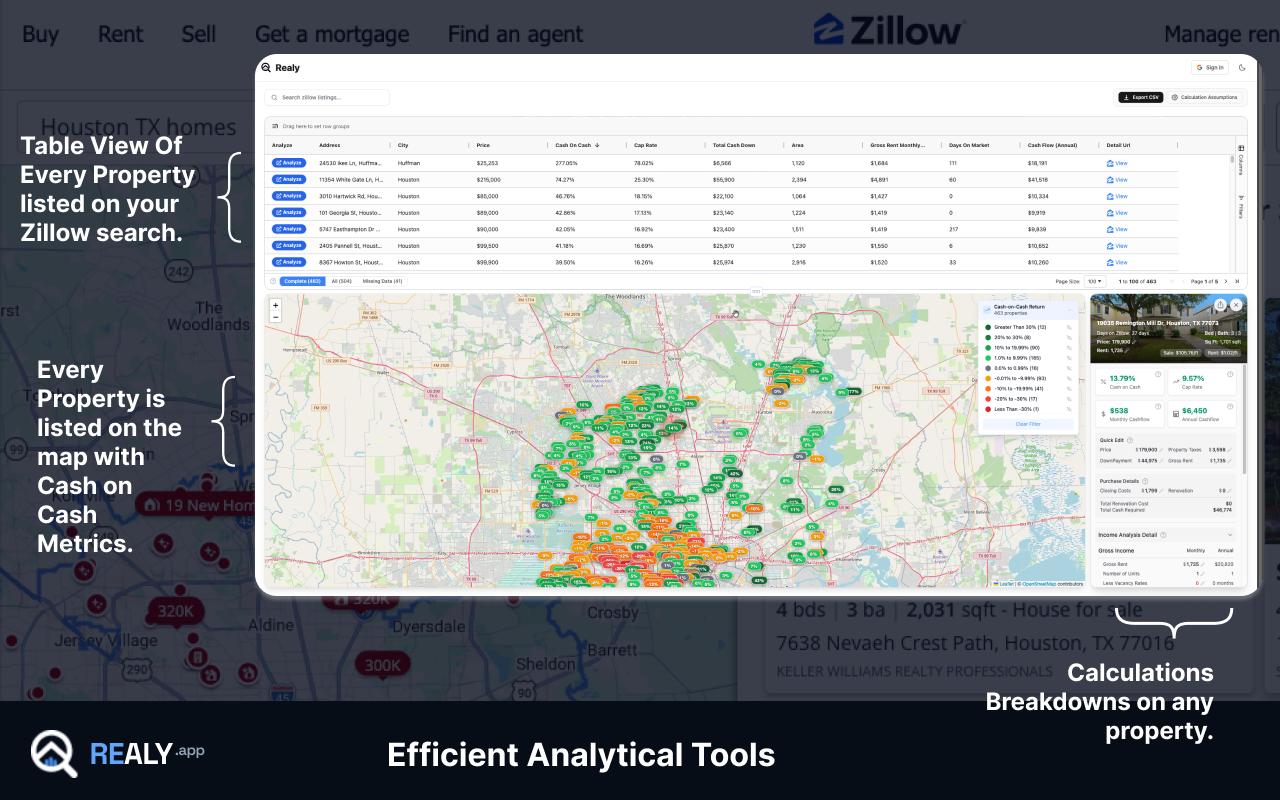
Realy is a Zillow-focused rental property analyzer that adds institutional-style metrics to search results and individual listings. It is built for investors who want to rank entire markets by cash-on-cash or cap rate, then drill into winners without rebuilding a spreadsheet for every address.
Best for
- Buy & hold and rental property investors who browse Zillow daily
- Investors who need bulk analysis with exportable calculated data
- Users who want full control of calculation assumptions (taxes, financing, vacancy, insurance, HOA, management, renovation)
- Anyone comparing dozens of listings in one session
Key features (documented)
- Full calculation assumption customization across financing and operating expenses
- Bulk data extractor with calculated fields included
- Export bulk analysis including calculations and assumptions
- Dedicated bulk analysis page with:
- Fully customizable table columns and UI theme
- Map view with custom clickpoints
- Smart filters
- Single-property drill-down from map or table
- Individual property UI on Zillow with easy, full field customization
- Dedicated analysis page at
realy.app/analysis?...with fully customizable calculations and inputs - Generous free tier
Investment metrics (calculation engine)
Realy's engine computes, among others:
Effective Gross Income = Annual Rent − Vacancy Loss
NOI = Effective Gross Income − Operating Expenses
Cap Rate = NOI ÷ Purchase Price
Cash-on-Cash = (NOI − Annual Mortgage) ÷ Total Cash Invested
DSCR = NOI ÷ Annual Mortgage Payment
Default assumptions include 20% down, 1% closing costs, 6.5% interest, 30-year loan, and 2% property tax, all editable. See cash-on-cash formula and cap rate guide.
Workflow
- Open a Zillow search results page (e.g. Dallas listings)
- Click the floating Open Realy Analyzer button
- Review table + map with cap rate, CoC, and cash flow on every listing
- Adjust assumptions globally; metrics recalculate instantly
- Click any row or map pin → property side panel with full detail
- Click Detailed analysis → full
realy.apppage with synced assumptions and shareable reports
Full walkthrough: How the Realy Chrome extension works.
Pros
- Strongest documented bulk workflow in this comparison
- Export includes calculations + assumptions, rare among extensions
- Map + table + filters for geographic deal hunting
- Deepest assumption control on both extension and web app
- Single-listing and bulk in one product
- Generous free tier for testing markets
Cons
- Zillow only today (Redfin/Realtor not documented)
- Residential buy-and-hold focus: BRRRR, flip, and Airbnb modes not listed in comparison data
- No documented AI chat or ARV/comp engine like BetterDeal AI
- Portfolio tracking across owned assets not documented
Pricing
Generous free tier documented; paid tiers per realy.app pricing page.
Ease of use
Low friction once installed: one click from Zillow search opens the full analyzer. Assumption depth is powerful but may require learning for first-time investors, mitigated by first rental checklist.
Investor type fit
| Investor type | Fit |
|---|---|
| Beginners | Good if willing to learn assumptions |
| Buy & hold | Excellent |
| BRRRR | Good (renovation $ input; no dedicated BRRRR mode documented) |
| Flippers | Moderate (no ARV/comp suite documented) |
| Wholesalers | Strong for bulk screening and export |
| Teams | Strong via export/share; team seats not documented |
Why advanced investors may prefer Realy
Advanced investors optimize for throughput and assumption consistency. Realy is the only tool in this comparison that combines:
- Bulk search analysis with pre-calculated fields
- Assumption-aware export
- Map-based pattern recognition
- Per-property deep dive with synced web app
That matches how pros actually work: screen wide, underwrite narrow, export what matters.
Realy calculation assumptions (documented depth)
Realy exposes assumption controls across recurring expenses, loan terms, and one-time costs, including fields many extensions skip:
| Category | Configurable inputs (documented) |
|---|---|
| Loan | Interest rate, down payment (% or $), loan duration (Cash, 10Y–30Y) |
| One-time | Closing costs (% or $), renovation ($ or $/sqft) |
| Recurring | Property tax (% of value or $ yearly), insurance, maintenance, vacancy (months), management (% of rent or $), HOA, utilities, other |
Percentage inputs (e.g. 20% down, 2% tax, 6.5% rate) convert to decimals in the engine before math runs, matching how professional models treat rates.
This matters because real estate ROI calculator outputs are only as honest as the expense lines behind them. Tools that model financing but ignore insurance, vacancy, and management produce pretty cap rates that die on contact with reality. See when high cap rate is a trap.
Search page analysis & bulk property analysis
Realy's documented differentiator is where analysis happens. Most extensions only overlay a single listing detail page. Realy adds a floating Open Realy Analyzer control on Zillow search result pages, the view investors actually use to discover inventory.
That opens a dedicated bulk UI with:
- Table view: sortable investment metrics across every listing in the current search
- Map view: custom clickpoints to explore geographic clusters
- Smart filters: narrow by metric thresholds without re-running Zillow filters
- Click-through: select any row or pin for single-property side panel analysis
For a visual walkthrough, see How the Realy Chrome extension works and the screenshots in our Houston top 10 analysis.
Reporting & export options
Export bulk data analysis with calculations and assumptions included is documented for Realy only in this comparison. That is critical for:
- Wholesalers sending deals to buyers with transparent math
- Partners underwriting the same assumptions
- Building an external CRM or tracker without re-keying data
Google Sheets export specifically is not documented in our feature matrix for any vendor. Verify current export formats on each product's site before building a Sheets-dependent workflow.
Collaboration
Team seats, shared workspaces, and comment threads are not documented for any of the five tools in this comparison. Teams today likely collaborate via exported analysis (Realy) or screenshots (others). Plan accordingly.
BetterDeal AI Review
Website: betterdeal.ai
Overview
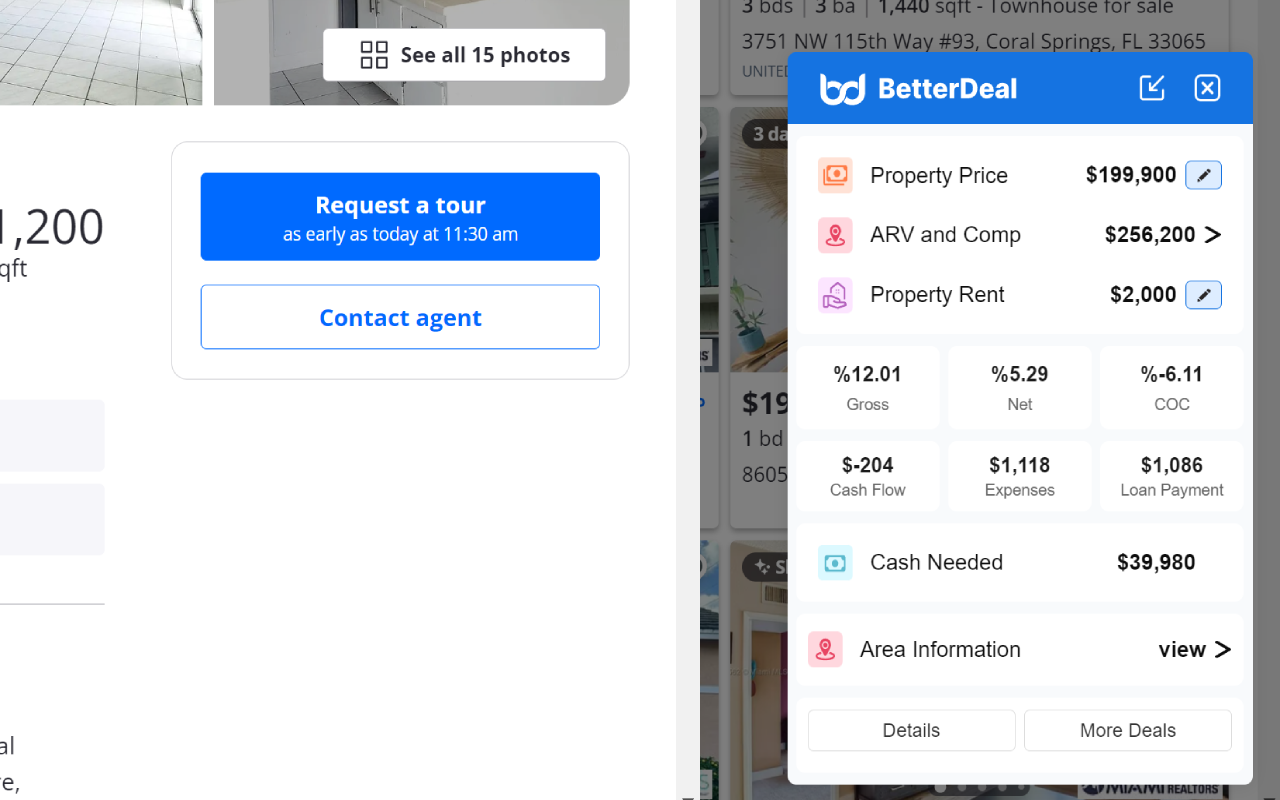
BetterDeal AI positions around one-click investment analysis and ARV calculation with comparables, a different angle than pure cash-flow screening. It appeals to investors who care about after-repair value and comp-driven pricing, not just rent-to-price ratio.
Best for
- Investors who prioritize ARV and comparables
- Single-property deep dives with a dedicated BetterDeal analysis page
- Users willing to tolerate slower analysis speed
Key features (documented)
- ARV calculation & comparables
- One-click investment analysis
- Bulk data analysis, but bulk is comparable data, not full search results; bulk does not include calculated data or calculation assumptions
- Limited calculation customization: loan period, loan amount, interest rate, down payment, down payment rate only
- Dedicated betterdeal.ai analysis page per property, without calculation customization on that page
- Limited features for new users
Pros
- Genuine strength in ARV and comps (not documented in other tools here)
- One-click analysis reduces friction on individual listings
- Dedicated property page for sharing a BetterDeal-branded view
Cons
- Slow relative to alternatives (documented)
- Bulk analysis lacks calculated fields and assumptions in export
- Calculation customization is narrow (financing fields only)
- Analysis page does not allow further assumption edits
- Limited free / new-user access
Pricing
Not fully documented in comparison data; limited features for new users noted.
Ease of use
One-click analysis is simple on surface; speed and new-user limits may frustrate high-volume screeners.
Investor type fit
| Investor type | Fit |
|---|---|
| Flippers / ARV-focused | Strongest case here |
| Buy & hold bulk screening | Weak (bulk lacks calculated export) |
| Wholesalers | Moderate (comps help; bulk limits hurt) |
BetterDeal AI alternative?
If you need full-search bulk ranking by cash-on-cash with exportable assumptions, Realy is the documented alternative. If you need ARV/comps first, BetterDeal AI has a capability Realy does not list in this comparison.
How BetterDeal fits flip vs. hold workflows
Fix-and-flip and wholesale assignment investors often anchor on ARV and repair estimates before they care about stabilized rent. BetterDeal AI's documented ARV calculation & comparables addresses that mental model directly on Zillow.
Buy-and-hold investors anchoring on rental property cash flow calculator outputs (monthly cash flow, CoC, cap rate) may find BetterDeal's limited financing customization and slow bulk workflow constraining when scanning hundreds of MLS-adjacent Zillow listings for yield.
Speed & new-user limits (documented)
Two practical warnings appear in our comparison data:
- Performance: BetterDeal is documented as slow relative to alternatives. For investors who re-run searches multiple times per day, latency compounds.
- Onboarding: Limited features for new users may gate access until upgrade or trial completion. Budget time to evaluate whether your workflow fits inside those limits before standardizing on it.
CashOn Review
Website: cashon.cash
Overview
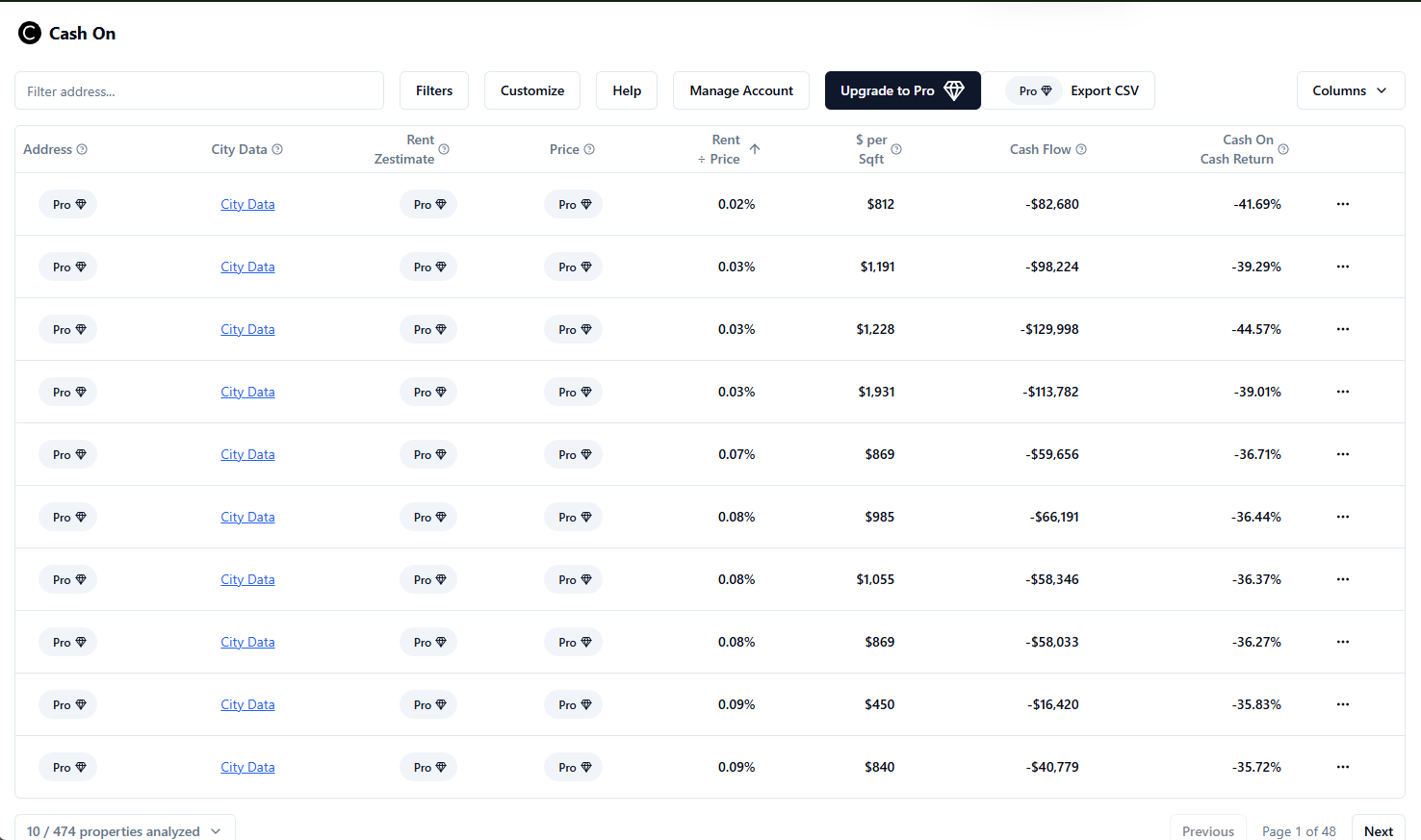
CashOn advertises analyzing hundreds of homes with customizable calculations, a volume play for investors scanning large Zillow result sets. Trade-offs appear in dashboard depth, export access, and per-property follow-through.
Best for
- High-volume initial screening across many listings
- Budget-conscious users testing bulk scan (with new-user limits)
Key features (documented)
- Analyzes hundreds of homes
- Customize calculations
- No custom dashboard for deeper detail views
- Low column management
- Very limited features for new users, especially bulk analysis export and viewing some calculated fields
- Slower bulk calculation compute time
- No individual property analysis documented
Pros
- Handles large listing counts in one pass
- Calculation customization available
Cons
- No individual property analysis page: hard to deep-dive one winner
- No robust dashboard for detail work
- Column management is weak for power users
- New-user limits on export and calculated fields
- Slower bulk performance documented
Pricing
Not fully documented; limited features for new users.
Ease of use
Simple for broad scans; frustrating when you need to underwrite one listing deeply or export freely.
Investor type fit
| Investor type | Fit |
|---|---|
| Quick market scan | Moderate |
| Serious underwriting | Weak (no individual analysis) |
| Data export / wholesaling | Weak for new users (export limits) |
CashOn alternative?
Investors who outgrow CashOn's dashboard and individual-analysis gaps typically need a tool with per-listing drill-down and assumption-rich export, documented strengths of Realy.
Column management & dashboard depth
Low column management is a documented CashOn limitation. Power users often want to:
- Show or hide cap rate, CoC, rent/sqft, and price/sqft together
- Reorder columns to match their buy box
- Theme tables for long screening sessions
Realy documents easily customizable table columns and UI theme control in its bulk view, relevant if you spend hours in the grid each week.
New-user export restrictions
Very limited features for new users (especially bulk analysis export and viewing some calculated fields) mean CashOn may function as a preview rather than a full investment property analysis software stack until you unlock paid tiers. Treat free-tier CashOn as a sample, not a pipeline, until you confirm export access on your account.
REIPrime Review
Website: reiprime.com
Overview
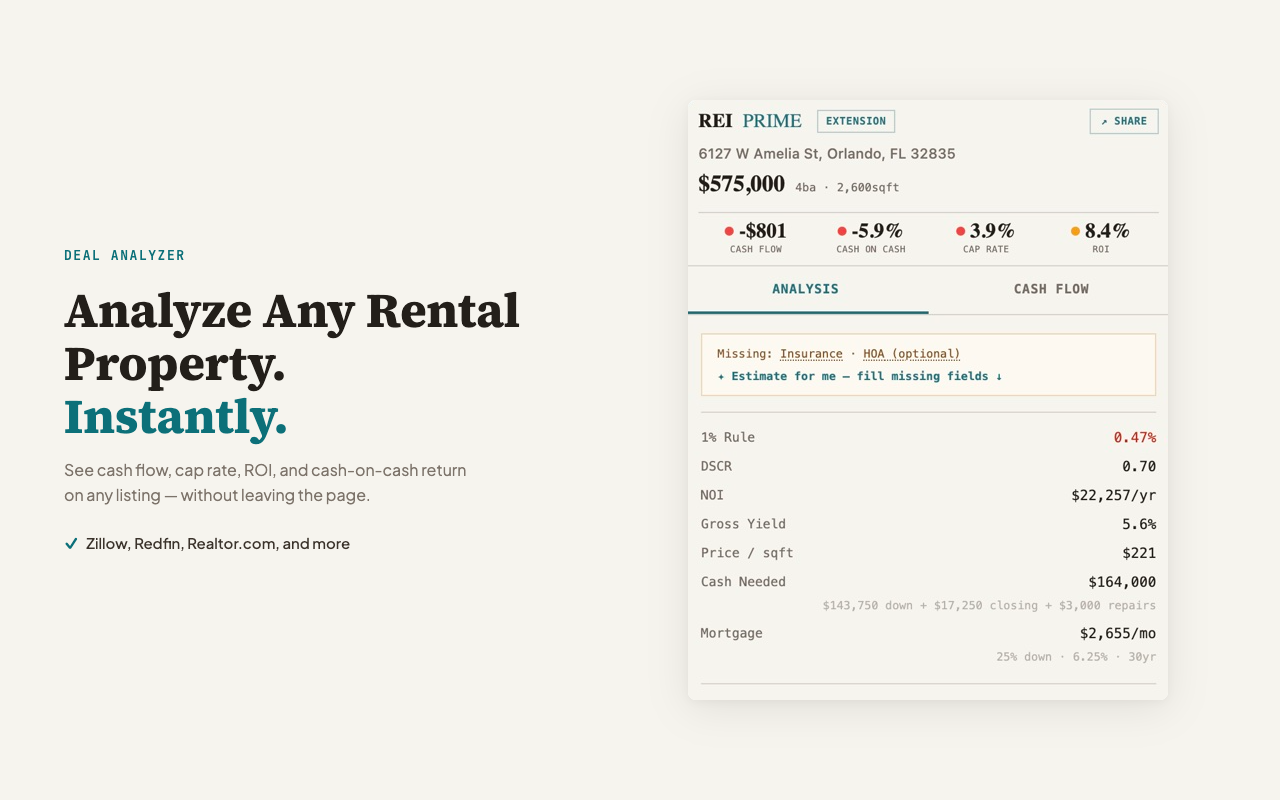
REIPrime focuses on instant analysis on individual listings with many calculation assumption inputs and a custom dashboard, at a free price point. It does not attempt bulk search analysis.
Best for
- Free single-listing checks
- Investors who analyze one property at a time
- Users who want many assumption fields without bulk workflow
Key features (documented)
- Instant analysis only: no bulk data analysis
- Many calculation assumption inputs to customize
- Custom dashboard for more detail: can customize calculation assumptions only; inputs are not customizable on the dashboard
- Free
Pros
- Free entry point
- Rich assumption inputs for instant analysis
- Dashboard adds structure vs. minimal overlays
Cons
- No bulk analysis: cannot rank a full Zillow search
- Dashboard customization is assumption-only, not full input editing
- Export, map view, and team features not documented
Pricing
Free (documented).
Ease of use
Straightforward for one listing; investors screening markets must repeat workflow per property.
Investor type fit
| Investor type | Fit |
|---|---|
| Beginners (free trial mentality) | Good |
| High-volume Zillow browsing | Poor (no bulk) |
| Buy & hold market sweeps | Poor |
REIPrime review summary
Excellent free instant calculator positioning. Not a replacement for bulk Zillow search analysis or export pipelines.
Dashboard vs. inputs (important distinction)
REIPrime's custom dashboard shows more detail than a minimal overlay, but documentation notes you can customize calculation assumptions only on that dashboard; inputs are not customizable there. In practice:
- You may set assumptions in one surface
- But you cannot freely edit every input field on the dashboard view itself
For investors who tweak rent, rehab, and tax line-by-line on every deal, confirm whether REIPrime's input model matches your diligence style before adopting it as your primary best rental property calculator.
How REIPrime compares on "many assumptions"
REIPrime is documented as having many calculation assumption inputs, putting it second only to Realy on assumption breadth in this group. The trade-off remains instant-only scope: you get depth on one listing, not market-wide ranking. A common hybrid stack is REIPrime for quick checks on emailed links plus Realy for weekly market sweeps, but that is workflow advice, not a documented integration.
Ostrich Review
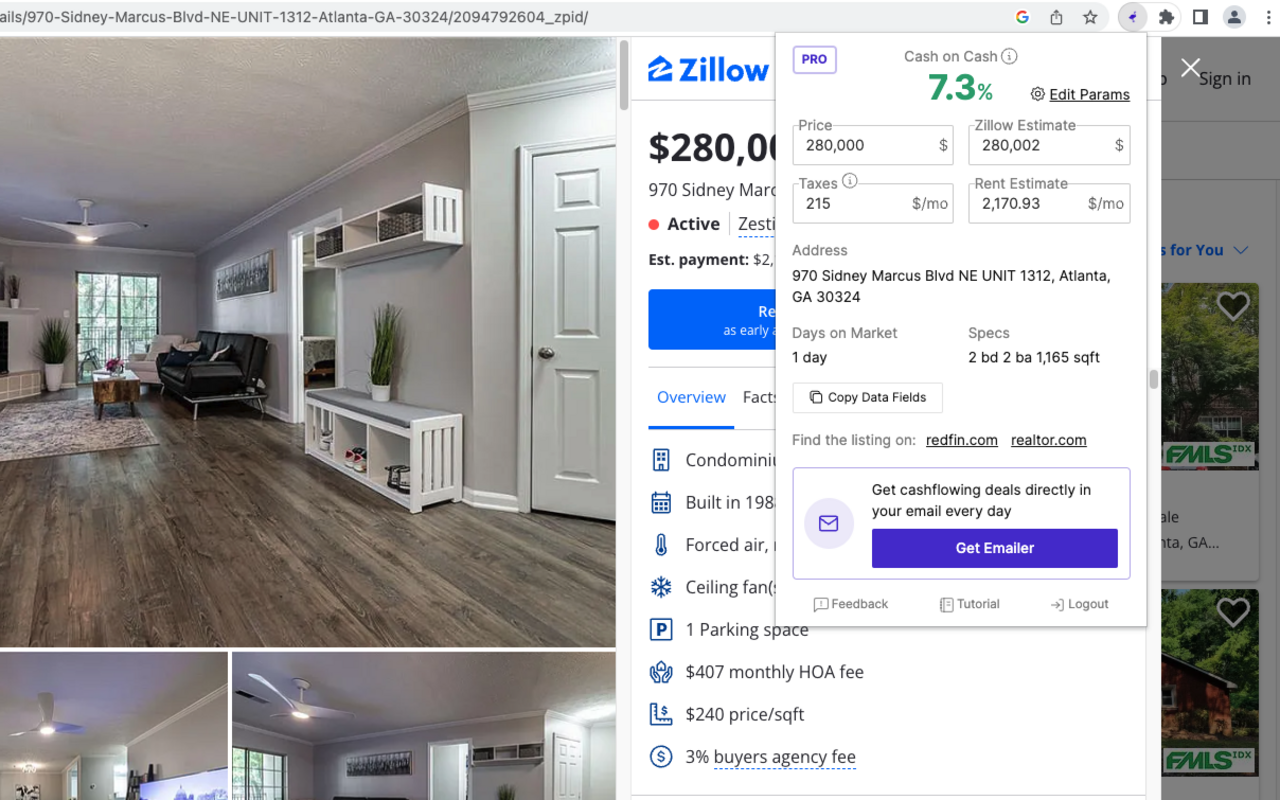
Chrome extension: Ostrich on Chrome Web Store
Overview
Ostrich is a lightweight, free extension for single-listing cashflow analysis on Zillow. Minimal assumptions, minimal scope: good for quick checks, not market-wide ranking.
Best for
- Casual single-listing screens
- Investors who want a free basic overlay
- Users who do not need bulk or export
Key features (documented)
- Limited calculation assumptions
- Single listings only: no bulk analysis
- Free
Pros
- Free and simple
- Low learning curve for one-off listing checks
- Cashflow-oriented branding matches rental investor intent
Cons
- No bulk analysis
- Limited assumptions vs. Realy or REIPrime
- No documented export, map, dashboard, or dedicated customizable web analysis page
Pricing
Free.
Ease of use
Easiest in the group for "open one listing, see a number." Least useful for professional screening volume.
Investor type fit
| Investor type | Fit |
|---|---|
| First-time curious investor | Good |
| Active market scanner | Poor |
| Professional / wholesaler | Poor |
Ostrich review summary
A free entry-level cashflow overlay. Investors who graduate to market-level workflows typically need bulk analysis and richer assumptions elsewhere.
Buyer's Guide: How to Choose a Zillow Analyzer
1. Accuracy starts with assumptions
No rental property calculator is accurate if inputs are wrong. Prioritize tools that let you edit:
- Financing (down payment, rate, term)
- Taxes (%, not guesswork)
- Vacancy and management
- Insurance and HOA
- Renovation (for value-add)
Realy and REIPrime document the deepest assumption surfaces; BetterDeal is limited to loan fields; Ostrich is limited overall.
2. Speed matters at scale
If you analyze one listing per week, speed is minor. If you analyze fifty per session, documented slow bulk compute (BetterDeal, CashOn) becomes a real cost. Test bulk on your target market before committing.
3. Investment metrics you need
| If you need… | Prioritize… |
|---|---|
| Cash-on-cash ranking | Realy (documented CoC engine) |
| ARV / comps | BetterDeal AI |
| Free single listing | REIPrime or Ostrich |
| Hundreds of quick passes | CashOn (watch new-user limits) |
| DSCR / loaded cap rate | Realy (documented) |
Learn the math: Cap rate vs cash-on-cash.
4. Bulk analysis vs. single listing
Ask: Do I find deals on search pages or from emailed links?
- Search-page investors → need bulk (Realy, limited CashOn/BetterDeal)
- Email/link investors → REIPrime, Ostrich, BetterDeal one-click may suffice
5. Export and workflow integration
Wholesalers and acquisition managers need export with assumptions attached. Only Realy documents this in our comparison. Google Sheets integration is not documented for any tool here. Verify on vendor sites before assuming.
6. Pricing and free tiers
| Tool | Free tier (documented) |
|---|---|
| Realy | Generous |
| REIPrime | Free |
| Ostrich | Free |
| BetterDeal AI | Limited for new users |
| CashOn | Limited for new users |
7. Customization depth
Power users should favor Realy (full assumptions + column/table UI) or REIPrime (many inputs, no bulk). Casual users may prefer Ostrich or REIPrime instant mode.
8. Red flags when evaluating any tool
- Metrics with zero expense assumptions (high cap rate traps)
- Rent estimates you cannot override
- No way to model vacancy or management for out-of-state deals
- Bulk tools that omit calculated fields on export
9. Support & documentation
None of the five tools' customer support quality is documented in our matrix. Evaluate response time and onboarding docs independently. Realy publishes calculation guides on its blog (NOI, CoC, rent-to-price) for investors learning metrics, not a substitute for vendor support, but useful for teams standardizing underwriting language.
10. Match tool to investing strategy
| Strategy | Primary question | Tool direction (from documented features) |
|---|---|---|
| Buy & hold rentals | Does it cash-flow after real expenses? | Realy (bulk + metrics); REIPrime (free single) |
| BRRRR | What is stabilized NOI after rehab? | Realy (renovation input); BetterDeal (ARV/comps) |
| Flip / wholesale | What is ARV and margin? | BetterDeal (ARV/comps documented) |
| Out-of-state turnkey | Can I model mgmt + vacancy remotely? | Realy (full assumptions); avoid Ostrich (limited) |
| First deal / learning | Can I experiment free? | Ostrich, REIPrime (free); Realy (generous free tier) |
11. Run a 30-minute bake-off
Before paying for any premium tier:
- Pick one Zillow search URL (20–40 listings).
- Install two finalists (e.g. Realy + one competitor).
- Set identical financing: 20% down, your actual rate, 2% tax, 1 mo vacancy, $1,200 insurance.
- Rank the same search by cash-on-cash.
- Export or screenshot top 5 from each tool.
- Compare whether rankings and numbers align within ~5%.
If a tool cannot complete step 4 on search results (only single listings), your answer is already clear for volume investors.
Which Zillow Analyzer Should You Choose?
Beginners
Start with: REIPrime (free, instant) or Ostrich (free, simple) to learn metrics on single listings.
Graduate to: Realy when you are ready to rank full searches and customize assumptions properly. Read first rental checklist.
Buy & hold rental investors
Best fit: Realy. Bulk search analysis, full assumptions, map/table, individual drill-down, and export align with how buy-and-hold investors actually browse Zillow.
BRRRR investors
BetterDeal AI if ARV and comps dominate your workflow.
Realy if you model renovation costs and stabilized rent in assumptions and want bulk screening. See value-add on Zillow and BRRRR guide. Dedicated BRRRR modes are not documented for any tool in this comparison.
Flippers
BetterDeal AI leads on documented ARV/comps. Realy helps screen acquisition basis quickly but does not list a comp engine.
Wholesalers
Realy for bulk calculated export and ranking. CashOn may scan volume but export limits and no individual analysis are documented weaknesses.
Professional investors & analysts
Realy for throughput, assumption control, map intelligence, and export. Pair with external comp sources if you need BetterDeal-style ARV.
Teams
None of the five document team collaboration features in our comparison. Realy's export with assumptions is the most documented path for sharing analysis externally.
FAQ
What is the best Zillow analyzer?
For bulk search analysis with full assumptions and export, Realy is the strongest documented option in this comparison. For free single-listing analysis, REIPrime or Ostrich. For ARV/comps, BetterDeal AI.
Which Chrome extension works with Zillow?
All five (Realy, BetterDeal AI, CashOn, REIPrime, and Ostrich) are Chrome extensions that work on Zillow per this comparison.
What is the best Zillow Chrome extension for rental property?
Depends on workflow: Realy for bulk rental screening with cap rate and cash-on-cash; Ostrich for basic free cashflow on one listing.
What is the best rental property analyzer?
Investors who need customizable assumptions + bulk + export should evaluate Realy first. REIPrime fits free instant single-property analysis.
Which calculator gives the best cash-on-cash return accuracy?
Accuracy depends on your inputs, not the brand. Realy documents a full cash-on-cash formula tied to NOI and financing. Always add vacancy, insurance, and management before trusting CoC. See CoC formula.
What is the best cash-on-cash calculator for Zillow?
Realy documents end-to-end CoC on search results and listings with editable assumptions.
What is the best cap rate calculator?
Realy calculates cap rate and loaded cap rate (NOI ÷ total property cost) per its engine. See good cap rate guide.
What is the best investment property calculator?
For Zillow-native bulk workflows, Realy. For ARV-focused deals, BetterDeal AI. For free quick checks, REIPrime.
What is BetterDeal AI?
BetterDeal AI is a Zillow Chrome extension with one-click analysis, ARV/comps, limited bulk comparable data, and a dedicated analysis page without calculation customization on that page.
Is BetterDeal AI worth it?
Worth evaluating if ARV and comparables are central to your strategy. Less ideal if you need fast bulk export with calculated assumptions.
What is CashOn?
CashOn is a Chrome extension that analyzes hundreds of Zillow homes with customizable calculations but no individual property analysis and limited new-user export per documented comparison.
Is CashOn worth it?
May suit quick high-volume passes. Less suited if you need deep per-listing underwriting or export without upgrading past new-user limits.
What is REIPrime?
REIPrime offers free instant analysis on single listings with many assumption inputs and a dashboard, but no bulk analysis.
Is REIPrime worth it?
Strong free option for one-off analysis. Not a bulk market scanner.
What is Ostrich?
Ostrich is a free Chrome extension for single-listing cashflow analysis with limited assumptions and no bulk analysis.
Is Ostrich worth it?
Good free starting point. Investors outgrow it when they need bulk ranking and richer assumptions.
What is Realy?
Realy is a Zillow Chrome extension and web app that provides bulk search analysis, full calculation assumptions, map/table views, export with calculations, and dedicated per-property analysis pages at realy.app.
Does Zillow calculate ROI?
No. Use a Zillow investment calculator extension. Details here.
Can I analyze Zillow listings automatically?
Yes, with extensions. Realy automates analysis across full search result pages. Others focus on single listings or limited bulk.
Which extension exports Zillow listings with investment data?
Realy documents bulk export including calculations and assumptions. CashOn has limited export for new users. Others not documented here.
Which tool is fastest for bulk analysis?
Realy is documented as fast for bulk workflows. BetterDeal AI and CashOn are documented as slower for bulk/compute.
Can these tools replace a spreadsheet?
For Zillow screening, yes, especially Realy vs. manual paste workflows. See Realy vs spreadsheet. Complex LP models may still need Excel.
Do any of these support BRRRR calculators?
Dedicated BRRRR modes are not documented in this comparison. Realy supports renovation inputs; BetterDeal supports ARV/comps. See BRRRR on Zillow.
Do any support flip calculators?
BetterDeal AI documents ARV and comparables. Others do not list flip-specific modes in this comparison.
Do any support Airbnb analysis?
Not documented for any of the five tools in this comparison.
Which tool has AI features?
AI features are not documented in the supplied comparison data for these products (BetterDeal AI branding includes "AI" but specific AI chat/features are not detailed in our matrix).
What is the best real estate Chrome extension overall?
For documented bulk Zillow search analysis with export, Realy. For free single-listing use, REIPrime or Ostrich. For ARV/comps, BetterDeal AI.
How do I analyze investment properties on Zillow for free?
Ostrich and REIPrime are documented free. Realy offers a generous free tier with broader bulk features than competitors' free tiers per this comparison.
What metrics should a rental property analysis tool include?
At minimum: gross rent, operating expenses, NOI, cap rate, cash flow, cash-on-cash. Advanced: DSCR, rent/sqft, loaded cap rate. Realy documents all of these in its engine.
Is a cap rate calculator enough?
No. Cap rate ignores financing. Pair cap rate with cash-on-cash and monthly cash flow for levered buy-and-hold decisions. Cap rate vs CoC explained.
Which tool is best for analyzing hundreds of homes?
CashOn and Realy both document high-volume analysis. Realy adds calculated bulk export and individual drill-down; CashOn documents slower compute and new-user export limits.
Conclusion
There is no single "best" real estate investing tool for every investor. There is the best tool for your workflow.
| Tool | Core strength | Main trade-off |
|---|---|---|
| Realy | Bulk Zillow analysis, full assumptions, export, map/table | Zillow-only; no documented ARV/comp suite |
| BetterDeal AI | ARV & comparables, one-click analysis | Slow; limited bulk calculated export |
| CashOn | Hundreds of homes scanned | No individual analysis; export/dashboard limits |
| REIPrime | Free instant analysis, many assumptions | No bulk |
| Ostrich | Free simple single-listing cashflow | Limited assumptions; no bulk |
If you live in Zillow search results and need a true rental property analysis tool, not a prettier spreadsheet, start with Realy. Install the extension, run one market with your real financing assumptions, and compare the output to how you analyze today.
Add Realy to Chrome (free tier) →
Continue reading: How to find cash-flowing rentals on Zillow · Top 10 Houston listings ranked by CoC · Extension setup guide
Found this useful?
Share it with an investor friend or teammate.